Understanding Network Devices: How the Internet Reaches You
When you open Google, watch YouTube, or deploy your own website, a lot of network devices quietly work together behind the scenes.
Most people hear words like modem, router, switch, or firewall — but don’t really know what each one does or why it matters.
lets understand step by step,
What is a Modem and How It Connects Your Network to the Internet?
A modem is the basically entry gate to the internet. its connects your home or office to your ISP’s network.
Your Internet Service Provider (ISP) sends internet signals through:
Fiber cables
Telephone lines
Cable TV lines
But your computer cannot understand those signals directly.
What a Modem Does
Modulates data from your ISP into digital signals your network can understand
Demodulates data from your devices back into a form the ISP understands
👉 That’s why it’s called a Modem (Modulator + Demodulator).

What is a Router and how it directs traffic?
A router is a networking device that connects multiple networks (such as your home LAN and the Internet WAN) and directs data traffic between them .It acts as a dispatcher, analyzing data packets to determine the most efficient route for transmission, allowing multiple devices to securely share a single internet connection.
Difference from Modems:
A modem connects your home to your Internet Service Provider (ISP), bringing the internet in, while a router connects your devices to each other and to that internet signal. The modem translates signals (modulation/demodulation), and the router distributes this connection via Wi-Fi or Ethernet.
Switch vs Hub: how local networks actually work?
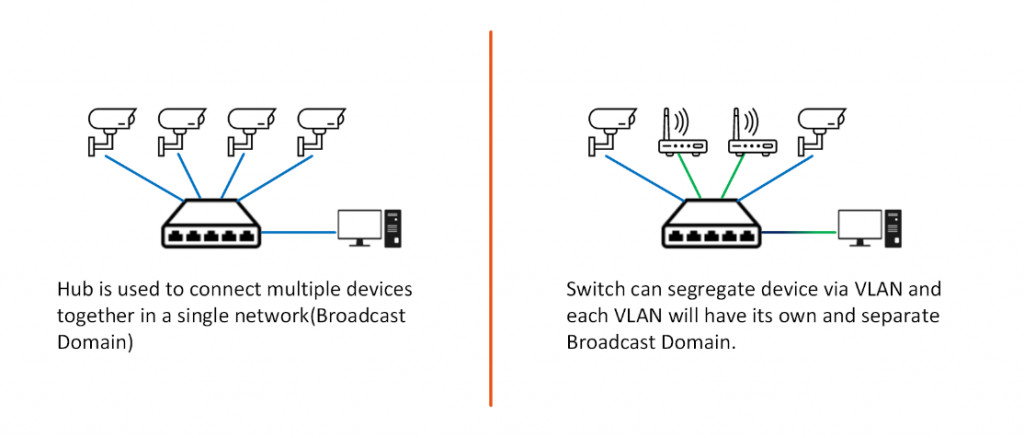
Hubs and switches connect devices (computers, printers) in a LAN to exchange data.
hub
A hub is a very basic device. its an dumb device. its sending incomming data and broadcast to all connected system.
A hub is a central device in networking that connects multiple computers or devices to a local area network.
switch
A switch is smart. sending data only to the intended device, Uses MAC addresses,faster than hub ,also secure
What is a Firewall and why security lives here?
A firewall is a network security system—available as software or hardware—that monitors and controls incoming and outgoing network traffic based on predetermined security rules. It acts as a barrier between a trusted internal network and untrusted external networks (like the internet), blocking malicious data packets to prevent unauthorized access and cyberattacks.
What a Firewall Does
Allows safe traffic
Blocks malicious traffic
Applies security rules
Examples:
Block unknown IP addresses
Allow only HTTPS traffic
Prevent unauthorized access
Without a firewall:
Hackers can enter easily
Malware spreads faster
Data is at risk

What is a Load Balancer and why scalable systems need it?
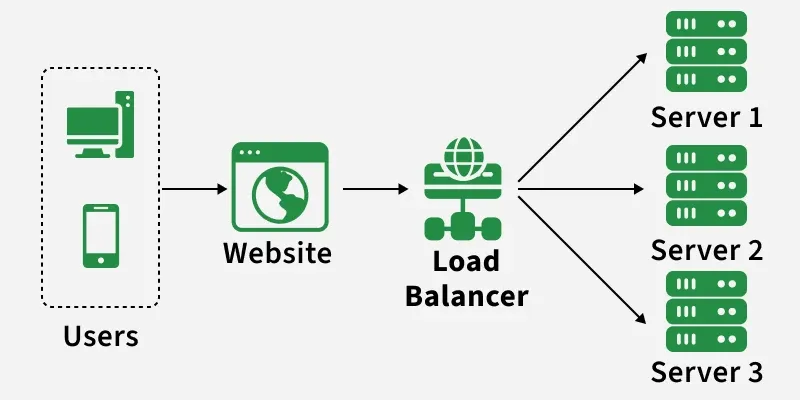
A load balancer is a device or software that acts as a "traffic cop" for network or application requests, distributing them across multiple servers to prevent overload, improve performance, and ensure high availability.ensuring no single server gets overwhelmed and providing seamless failover if a server fails, making applications more reliable and scalable.
Example:
1 million users visit a website
Load balancer sends requests to:
Server 1
Server 2
Server 3
If one server fails?
- Traffic is redirected to healthy servers
How all these devices work together in a real-world setup?
Network Flow
Internet comes from ISP
Your ISP (Internet Service Provider) is the company that gives you internet
(for example: Jio, Airtel, BSNL).ISP owns large networks and data centers
They connect your home/office to the global internet
Internet travels through fiber, cable, or phone line
Modem converts ISP signal into digital data
The signal coming from the ISP is not directly usable by your devices.
What the Modem Does
Converts ISP signals into digital data
Makes the internet understandable to your network
Acts as the entry point of the internet
Router receives data and routes it
Now the internet has entered your network.
What the Router Does
Creates your local network (LAN)
Assigns IP addresses to devices (phones, laptops, TVs)
Decides which device requested which data
Firewall checks if traffic is safe
Before data is allowed inside your network, it must be checked.
What the Firewall Does
Inspects incoming and outgoing traffic
Allows safe traffic
Blocks malicious or unauthorized traffic
Switch sends data to the correct device
Inside the local network, multiple devices are connected.
What the Switch Does
Receives data from the router
Sends it only to the intended device
Uses MAC addresses to identify devices
- Load Balancer (in large systems) distributes traffic across servers
This step is common in data centers, websites, and cloud systems, not homes.
What a Load Balancer Does
Receives traffic from users
Distributes it across multiple servers
Prevents any single server from overload

Conclusion
Every time you access the internet, multiple network devices work together behind the scenes to make the experience fast, secure, and reliable. The ISP provides the connection, the modem brings the internet into your network, the router directs traffic to the right devices, the firewall protects against threats, the switch ensures efficient local communication, and the load balancer keeps large systems running smoothly under heavy traffic.
Each device has a specific role, and removing even one can impact performance, security, or scalability. Understanding how these components interact helps you see networking not as a complex mystery, but as a well-organized system where every part matters—from a small home network to large-scale cloud infrastructures.